
VAT Calculator
Add VAT to a net amount or remove VAT from a gross amount instantly. Supports any VAT rate.
Our free online VAT calculator makes it easy to add or remove VAT from any amount. Enter the amount and VAT rate, then choose whether you want to calculate VAT on a net price or remove VAT from a gross price. The VAT calculator instantly shows the VAT amount, net amount, and gross amount.
How to Use the VAT Calculator
Our VAT calculator is designed to handle both sides of a VAT calculation—whether you need to add VAT to a price or work backwards from a VAT-inclusive total.
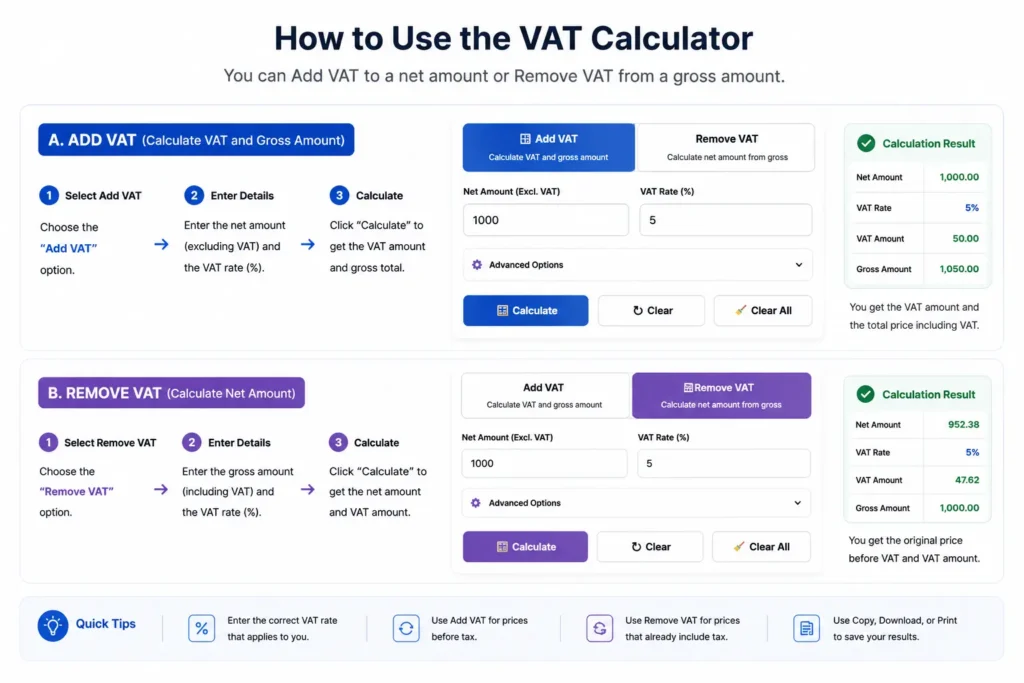
Choose Add VAT when you know the price before VAT. Enter the amount and your applicable VAT rate (%), then select Calculate VAT. The calculator will show the net amount, VAT amount, and gross amount.
Choose Remove VAT when your price already includes VAT and you want to find the original price before tax. Enter the gross amount and VAT rate, and the calculator will automatically work out the VAT portion and net price. This makes it useful as a reverse VAT calculator or VAT removal calculator too.
Because VAT rates and rules vary between countries, you can enter the percentage that applies to your calculation rather than being limited to one fixed rate. For general information about VAT systems internationally, see the OECD guidance on consumption taxes.
Example:
If an item costs 100 before VAT and you enter a 20% VAT rate, the VAT amount is 20 and the VAT-inclusive price is 120. If you start with 120 including 20% VAT and use Remove VAT, the calculator works backwards to a net price of 100.
How to Calculate VAT
Calculating VAT depends on whether you are starting with a net price (excluding VAT) or a gross price (including VAT). The calculation is slightly different in each case.
VAT Formula for Adding VAT
If you know the price before VAT, calculate the VAT amount using:
VAT Amount = Net Amount × (VAT Rate ÷ 100)
Then calculate the total price including VAT:
Gross Amount = Net Amount + VAT Amount
For example, if the net price is 1,000 and the VAT rate is 5%:
VAT Amount = 1,000 × (5 ÷ 100) = 50
Gross Amount = 1,000 + 50 = 1,050
So, 5% VAT on 1,000 is 50, making the final VAT-inclusive price 1,050.
VAT Formula for Removing VAT
Removing VAT is different from simply subtracting the VAT percentage from the total. When a price already includes VAT, use the reverse VAT formula:
Net Amount = Gross Amount ÷ (1 + VAT Rate ÷ 100)
Then:
VAT Amount = Gross Amount − Net Amount
For example, if the VAT-inclusive price is 1,050 and the VAT rate is 5%:
Net Amount = 1,050 ÷ 1.05 = 1,000
VAT Amount = 1,050 − 1,000 = 50
How to Add VAT to a Price
Adding VAT is straightforward when you know the price before VAT and the applicable VAT rate. First, calculate the VAT amount, then add it to the original net price.
For example, suppose an item costs 200 excluding VAT and the VAT rate is 20%:
VAT Amount = 200 × 20 ÷ 100 = 40
Price Including VAT = 200 + 40 = 240
The final price is therefore 240, of which 40 is VAT.
You can do the same calculation automatically using the Add VAT option in the VAT calculator above. Enter the net amount, type the VAT percentage that applies to you, and select Calculate.
How to Remove VAT From a Price
If a price already includes VAT, you need to work backwards to find the original net price. This is often called removing VAT, deducting VAT, or a reverse VAT calculation.
For a VAT-inclusive price of 240 at a 20% VAT rate:
Net Amount = 240 ÷ 1.20 = 200
VAT Amount = 240 − 200 = 40
So the price before VAT is 200, while 40 of the 240 total represents VAT.
A common mistake is to simply subtract 20% from a price that includes 20% VAT. That produces the wrong result because the VAT percentage was originally calculated from the net amount, not the gross amount.
This is also known as a reverse VAT calculation. You can use the Remove VAT option in the calculator above to perform the calculation automatically.
VAT Inclusive vs VAT Exclusive
When working with VAT, prices are usually shown as either VAT inclusive or VAT exclusive. Knowing the difference helps you understand exactly how much you are paying before and after VAT.
What Does VAT Exclusive Mean?
A VAT-exclusive price is the net price before VAT has been added. VAT is calculated separately and added to this amount to get the final price.
For example, if a product costs 500 excluding VAT and the VAT rate is 10%:
Net Amount: 500
VAT Amount: 50
Gross Amount: 550
So, 500 is the VAT-exclusive price, while 550 is the amount payable after VAT is added.
What Does VAT Inclusive Mean?
A VAT-inclusive price already contains VAT. This is the gross or final amount paid by the customer.
If the total price is 550 including 10% VAT, the breakdown is:
Gross Amount: 550
Net Amount: 500
VAT Amount: 50
If you only know the VAT-inclusive total, use the Remove VAT option in the calculator above to find the net amount and the VAT portion.
VAT Inclusive vs Exclusive at a Glance
| Price type | Meaning | Example at 10% VAT |
|---|---|---|
| Net / VAT Exclusive | Price before VAT | 500 |
| VAT Amount | Tax added to the net price | 50 |
| Gross / VAT Inclusive | Price after VAT | 550 |
One important point is that adding and removing VAT are not opposite percentage calculations. Adding 10% to 500 gives 550, but removing VAT from 550 requires dividing by 1.10, rather than simply subtracting 10%.
This distinction is especially useful for invoices, quotations, product prices and other situations where you need to determine whether an amount is before or after VAT.
| VAT Rate | Net Amount | VAT Amount | Gross Amount |
|---|---|---|---|
| 5% | 1,000 | 50 | 1,050 |
| 10% | 1,000 | 100 | 1,100 |
| 15% | 1,000 | 150 | 1,150 |
| 20% | 1,000 | 200 | 1,200 |
| 25% | 1,000 | 250 | 1,250 |
Frequently Asked Questions
Multiply the net amount by the VAT rate divided by 100.
VAT Amount = Net Amount × (VAT Rate ÷ 100)
Then add the VAT amount to the net price to get the gross total.
If the amount already includes VAT, divide the gross amount by:
1 + (VAT Rate ÷ 100)
For example, to remove 20% VAT from 120:
120 ÷ 1.20 = 100
So the net amount is 100 and the VAT portion is 20.
No. If a price already includes VAT, simply subtracting the percentage gives the wrong result. You need to use a reverse VAT calculation because the VAT was originally calculated from the net price.
The net amount is the price before VAT. The VAT amount is the tax added to the net price. The gross amount is the final price including VAT.
A VAT-inclusive price already contains VAT. If you want to find the original price before tax, use the Remove VAT option in the calculator.
A VAT-exclusive price is the amount before VAT is added. Use the Add VAT option to calculate the VAT amount and final gross price.
Yes. Enter the VAT percentage that applies to your calculation. This makes the calculator useful across different countries and situations where VAT rates may vary.
Use the reverse VAT formula:
Net Amount = Gross Amount ÷ (1 + VAT Rate ÷ 100)
Then subtract the net amount from the gross amount to find the VAT portion.
Calculate VAT Quickly and Accurately
For the most accurate result, always use the VAT rate that applies to your country, transaction, goods, or services. For other percentage-based calculations, you can also use our Percentage Calculator.